

New Widget
HighLevel Hero Banner Widget
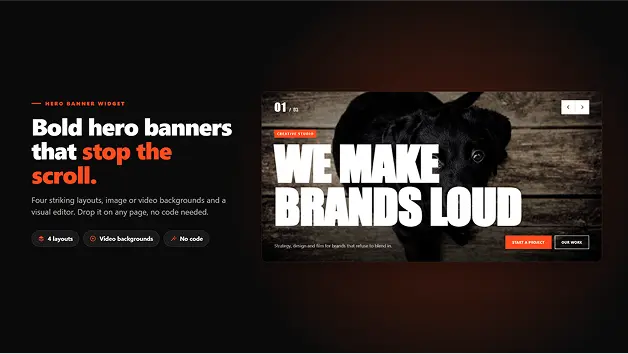
Create eye-catching hero sections with image and video backgrounds that capture visitors' attention. Select from 4 unique layouts, add headlines and call-to-action buttons to slides, and create responsive banners using the simple visual editor.
$10*
*Pricing is on monthly/yearly basis

Available Now

Lifetime updates
At a Glance

Best For
Businesses & Brands
Digital Marketing Agencies
E-commerce Businesses
Creative Professionals

Alternatives
Static Hero Sections
Basic Image Sliders
Standard Video Banners

Widget Integration

GoHighLevel

Widget Key Features
4 Unique Hero Layouts
Image & Video Backgrounds
MP4, YouTube & Vimeo Support
Autoplay Slides
Multiple Slides Management
Custom Headlines & Text
Up to 2 CTA Buttons per Slide
Live Desktop & Mobile Preview
Custom Styling Controls
Mobile-Specific Designs
Video Playback Controls
Keyboard & Swipe Support
Make Your First Screen Count
The hero section of your website is the first thing that visitors will see. If pages are using static banners and simple sliders, this makes them less engaging and restricts the ability to present your services, products, or offers.
With Hero Banner, you can create visually engaging openings using images, videos, bold headlines, and call-to-action buttons. Select an appropriate layout, personalize each slide, and design a responsive hero experience to inspire visitors to keep exploring.
4 Layouts for Every Hero Experience
Display your content in unique formats that will provide your website with a more visual opening. Take advantage of four different designs to develop hero sections that are aligned with your brand and messaging.
- Giant: Show big headlines across wide media, including a slide counter and progress bar.
- Diagonal: Overlay an angled colored panel over your background photo to give it an interesting editorial look.
- Accordion: Present information in a tall panel that can be opened, one at a time, suitable for services and collections.
- Ring: Use a circular timer and next-slide preview to create an engaging visual experience.

Bring Your Slides to Life with Images & Videos
Discover how to combine visual content with meaningful messages to make hero banners that grab attention. Manage slides easily and control how media appears and plays.
- Multiple Media Options: Add image backgrounds, MP4 videos, and videos from YouTube or Vimeo.
- Slide Content: Use a kicker, headline, description, and up to two buttons on each slide.
- Easy Slide Management: Add, duplicate, delete, and drag to reorder slides using the visual editor.
- Video Controls: Set sound, play/pause controls, autoplay, and automatic pause controls when the banner leaves the frame.
- Mobile-Friendly Media: Add poster images and choose to display posters on phones to help reduce mobile data usage.

Customize Every Detail to Match Your Brand
Create a banner design that matches the design of your website. Make typography, color, media, and responsive layout adjustments and preview changes.
- Use your existing page fonts automatically or select different fonts for your banner.
- Adjust different font sizes for headlines and text for desktop and mobile.
- Customize six color settings, overlay strength, and banner height.
- Preview your designs on desktop and mobile with helpful editor warnings.
- Utilize mobile-specific layouts, swipe navigation, keyboard controls, and screen reader support.

Setup Process
From Design to Live Hero Banner in 4 Simple Steps
Choose a layout, add media, customize, and publish.

Add the Hero Banner Widget
Install the widget on your website or funnel page and go to its visual editor.

Choose a Layout and Add Media
Choose from 4 layouts and add the images, videos, or background media that you like.

Customize Your Slides
Include headlines, descriptions, and CTA buttons. Adjust fonts, colors, overlays, heights, and responsive settings.

Preview and Publish
Go through your banner on desktop and mobile, do the final fixes, and publish it on your website or funnel.
What Our Clients Say!
Looking for the right tools to improve your business website? Pennine Technolabs brings practical solutions that help businesses create better digital experiences. Our Reviews Speak Louder!!

I had a fantastic experience! They were
incredibly easy to deal with and always
quick to respond and very efficient. The
entire process was smooth and hassle-free, making everything so much easier. I highly recommend their services to any Australians looking for a reliable and responsive team.

Jack Fricker

We had an amazing experience with
Pennine, their professional and
knowledgeable team delivered beyond our expectations. They understood our
requirements perfectly and provided
innovative solutions. Highly recommended!

Colleen Nagle
Pennine Technolabs created a magnificent ecommerce website for us that looks great and performs innocently. His team was professional, responsible and easy to work from beginning to end. We are really happy with the results and highly recommends their services!

Jorven Kael
FAQs on Hero Banner
Q) What is a Hero Banner Widget?
A Hero Banner Widget is a part of a site that presents big headlines, photos, videos, and call-to-action buttons at the top of a page. It improves businesses to make a engaging first impression on visitors and direct them to important actions.
Q) How many layouts are available in Hero Banner?
Hero Banner comes in four sizes: Giant, Diagonal, Accordion, Ring. There are multiple different visual styles for showcasing content in each layout.
Q) Can I use both images and videos as backgrounds?
Yes. You can use images, MP4 videos, YouTube videos, and Vimeo videos as slide backgrounds.
Q) Can I add multiple slides to one banner?
Yes. The visual editor allows you to add, duplicate, delete, and reorder slides. Every slide can have an individual kicker, headline, text, and up to two CTA buttons.
Q) Can I customize the design of my hero banner?
Yes. You can adjust the fonts, sizes of the title and the text, colors, strength of overlay, height of banner, and other appearance settings so that they match the appearance of your website.
Ready to Make Your Website's First Impression Unforgettable?

Related Products


Stop using boring static images. Four modern gallery layouts with interactive browsing, already set up for GoHighLevel. Available on the GHL Marketplace under Widgets.
$10*
Buy Now
Showcase your creative work with visually engaging portfolio layouts, smooth animations, and a full-screen lightbox. Select from four unique layouts, categorize projects, edit each design element, and develop a polished portfolio without the need for coding.
$10*
Buy Now