Quick Summary: Creating a cross-platform app with Flutter provides a smart balance between efficiency and performance. Flutter is a compelling option if you want a quick launch for startups, many customers, managing agencies, or enterprises enhancing their digital appearance. This bridges the gap between quality and speed, allowing developers to solve user problems and focus less on managing platform code repetition.
Flutter is essential for creating cross-platform apps since the demand for premium mobile apps and the expectation of a flawless functional system drive development. Get your programs flawlessly on Windows, macOS, iOS, or Android.
For developers and businesses, this demand offers both possibilities and challenges. Where cross-platform app development and frameworks like Flutter development come in, delivering an optimal user experience without distributing codebases on several platforms becomes vital.
What is Cross-Platform App Development?
Cross-platform app development involves creating a software program with a single codebase across several platforms. It enables one set of codes that apply to iOS development and Android development. This approach saves time, simplifies maintenance and upgrades, and reduces costs.
Old cross-platform solutions needed concessions in performance or user experience. In this regard, modern systems have greatly evolved and offer practically natural performance while preserving the efficiency of the shared code.
What is Flutter?
Flutter is an open-source UI software development kit made by Google. It was released in 2017 and has gained rapid popularity among developers due to its performance, flexibility, and ease of use. Flutter allows developers to create basic mobile, web, and desktop apps from a single codebase.
The core of Flutter consists of:
Dart Language: Flutter Apps are written in Dart, a language developed by Google. Dart is easy to learn and customize for rapid and reactive UI.
Widget: Everything is a widget in the pulsing, from button to layout. These widgets are highly adaptable, allowing developers complete control over how the app looks and behaves.
Rendering engine: Flutter uses its rendering engine (Skia), which ensures that the app’s UI looks and performs on all platforms.
Why Flutter cross platform App?
Flutter is an easy single-code tech stack for mobile app development. Flutter cross platform development has transformed the way businesses approach app creation. Here are some of the reasons why Flutter is the top choice:
- Single Codebase for Multiple Platforms
- Native Like Performance
- Real-time Reload system
- Customizable UI
- Strong Community and Ecosystem
Why choose Flutter for Cross Platform Apps Development?
Flutter mobile app development is now standard for producing cross-platform apps without managing various codebases.
1. Single codebase for all platforms
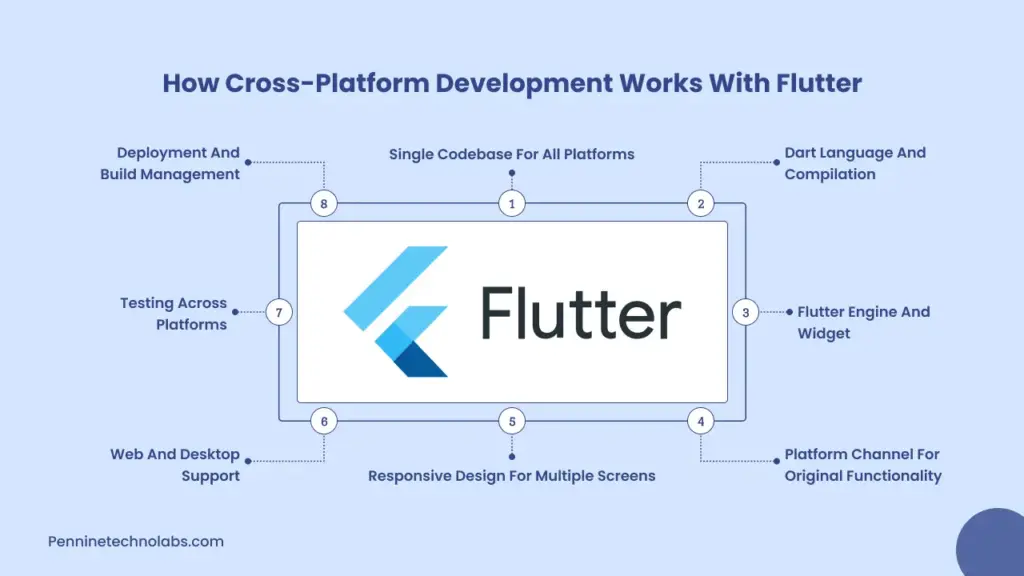
The single codebase idea is the foundation of the cross-platform functionality of Flutter. Developers produce all their logic and UI, separate for Android in Kotlin, in the programming language of Dart, and Flutter, and it is separate on the web in iOS and JavaScript. Depending on the platform, this code is later generated in the native machine language or JavaScript.
2. Dart language and compilation
The native run the Dart, a language that is for the development of a customer party. Dart supports the compilation of more time and just-in-time (JIT):
Development uses JIT so that the vibrations can provide equipment such as hot reloads, which helps developers to see the UI changes rapidly.
The production benefits from AOT. It generates indigenous machine code from the Dart code, improving performance and reducing the app launch time.
The Dart compiles the JavaScript for the web so that the same code runs effectively in browsers.
3. Flutter engine and widget
Flutter apps are manufactured with widgets instead of HTML or native components. Every element in a Flutter app, from the button to the navigation bar, is a widget. Depending on the platform-specific API, it guarantees the widget-based architecture that the UI appears equal on all platforms and provides full adaptability to Flutter developers.
4. Platform channel for original functionality
Even if most of your code is public, sometimes you may require access to platform-specific capabilities, including Bluetooth, sensors, or cameras. The platform channels interact with the original code generated in Java, Swift, or Objective-C.
5. Responsive Design for Multiple Screens
Flutter cross platform app offers capabilities for creating responsive UIs that change with varying screen widths and qualities. Widgets like Layout Builder, Media Query, and Aspect Ratio will enable you to customize how your layout changes, whether for a desktop monitor, tablet, or cell phone.
6. Web and Desktop Support
Flutter was initially designed for mobile but has since expanded to support web and desktop platforms. In construction for:
Web, Dart is compiled to JavaScript, and HTML and Canvas render the UI on the browser.
Desktop, Flutter backs Linux, macOS, and Windows. Offering the same performance advantages as on mobile, it compiles straight to native machine code.
You can target all these platforms with the same project, simplifying your development and maintenance efforts
7. Testing Across Platforms
Flutter provides a unified testing framework for unit, widget, and integration tests. The same tools let you test your UI and logic independently of the platform. Faster bug finding and more consistent cross-platform performance follow from this.
8. Deployment and Build Management
Flutter uses a single command-line tool to manufacture and deploy apps on various platforms. Whether you are emphasizing the Play Store, App Store, or web hosting service, Flutter handles it with integrated commands such as:
- Bash
- Copy
- Edit
- Flutter Build Apk
- Flutter Build Ios
- Flutter Build Web
- Flutter Build Windows
Key Tips for Building Successful Cross-Platform Apps with Flutter
If you are planning to create a cross platform app with Flutter, then keep in mind the following tips to get the most from the framework:
Plan your Platform – You must identify the goals and the required platform before implementing the Flutter framework.
Consistent UI – Always maintain your brand identity and design consistently to get a better experience.
Third-party Integration – Leverage the quality of third-party packages to maintain your project and keep it running smoothly.
Performance Optimization – Flutter is known for speed, avoids excessive widget nesting and rebuilds, and uses tools to debug your apps.
Testing Apps – Test your app on different devices and operating systems to ensure consistent behavior.
User Experience – Aim for excellence in UX. Smooth animations, fast loading times, and intuitive navigation are key to retaining users.
Stay Updated – Flutter is evolving rapidly. Staying current with the latest stable releases ensures you benefit from performance improvements.
Best React Native Alternatives in 2026
Businesses evaluate performance, scalability and long-term maintenance, with React Native alternatives in 2026. Flutter has a shorter development cycle, a platform-wide UI, and robust support with complex animations and modern app design.
Team comparing React Native and Flutter app development, Flutter offers a more accessible control of the UI display and reduced platform-specific restrictions. Native app development is the most suitable in cases where the application requires the highest performance and extensive hardware access, whereas applications such as ionic are fitted to be simple and content-based.
The appropriate cross-platform mobile app framework depends on your project objectives, financial constraints, and future scalability needs. React Native and Flutter mobile app usually come down to the expectations of performance, development speed, and project cost. Both solutions permit the creation of cross-platform apps with the same codebase. Flutter is becoming a more popular choice when apps require a consistent UI, high performance, and scalability in the long term.
React Native vs Flutter Cost Comparison in 2026
| Feature | React Native | Flutter |
|---|---|---|
| Development Cost | Moderate | Cost effective |
| Hourly Developer Rate | USD 25 to 60 | USD 20 to 55 |
| Time to Market | Fast | Faster due to fewer native dependencies |
| UI Consistency | Platform dependent | Fully consistent across platforms |
| Performance | Good | Near native performance |
| Maintenance Cost | Moderate to high | Lower due to single rendering engine |
| Scalability | Good | Excellent |
| Best For | React focused teams | Modern scalable mobile apps |
Why do we prefer Flutter over other Frameworks?
Choosing the proper development structure is a decision that directly affects the performance, scalability, and stability of your applications. After working with many popular cross-platform tools such as reacts native, Terrain, and Ionic, we constantly come back to Flutter. Not only for its technical powers, but also for the way it strengthens the entire development process. Here’s why we like Flutter development services on other outlines.
- True Cross Platform Capability
- Fast and Predictable Development Cycle
- Beautiful, Custom UIs Without Constraints
- Consistent Performance
- Less Time Spent on Debugging Platform Issues
- Strong and Growing Ecosystem
- First-Class Support from Google
- Unified Development Language
- Scalable and Maintainable Codebase
You are at the right place with Pennine Technolabs. We are a growing Flutter development company in India that develops web app solutions. Our expert developers build responsive and creative apps for all your business needs and goals. We offer great cross-app development platforms for your organization with regular updates and maintenance.
FAQs for Cross-platform with Flutter
Which platform can I target with Flutter?
Flutter supports app development for Android, iOS, web, Windows, macOS, and Linux using a single codebase. This allows developers to create constantly visible apps that run on all these platforms.
What`s the top React Native Alternative?
Both Flutter and React Native have strong abilities, but Flutter platforms provide native performance through direct compilation, and their rendering engine is better than React Native. Flutter doesn`t depend on platform-specific UI components, which reduces discrepancies.
Can I access native device features with Flutter?
Yes, Flutter offers a system called platform channel that allows your dart code to communicate with native code in Java (Android), Swift/Objective-C (iOS), or other platform-specific languages. This means that you can reach facilities like GPS, camera, Bluetooth and more.
How does Flutter handle app updates and maintenance?
Managing updates and bug fixes is easy since you are working with a single codebase. You only need to make changes at one location and deploy them on platforms, which speeds up maintenance cycles and reduces long-term costs.
How stable is Flutter for long-term projects?
Google backs Flutter and has a clear development roadmap. It receives regular updates, has strong community support, and is already used in major apps. It’s a solid choice for long-term projects.
What kind of apps can I build with Flutter?
You can build any app with Flutter, from eCommerce platforms and social media apps to enterprise dashboards, educational tools, and games. Its flexibility and performance make it suitable for both simple and complex applications.
How much does Flutter app development cost?
Flutter app development typically costs less than native development since a single codebase is used for multiple platforms. Overall cost depends on features, integrations, and app complexity.